
PotPlayer怎么设置DIRAC数据预读(怎么在PotPlayer里设置DIRAC数据预读)
作者:血瞳
更新时间:2023-02-16 14:49:02
•
阅读:
PotPlayer功能强大支持主流音频和视频格式。目前,在许多视频处理过程中,DIRAC自动音场将被校正。提前预读DIRAC数据可以帮助用户更有效地处理数据,使视频读取更加流畅。接下来,让我告诉你如何在PotPlayer中设置DIRAC数据预读。
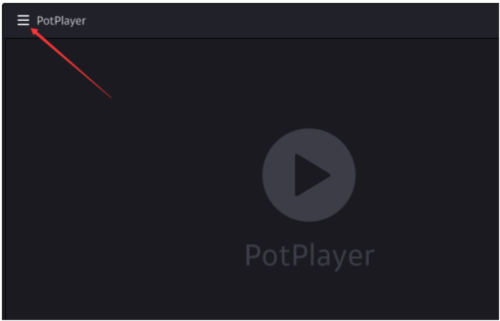
首先,打开软件,点击左上角的三条杠[更多]
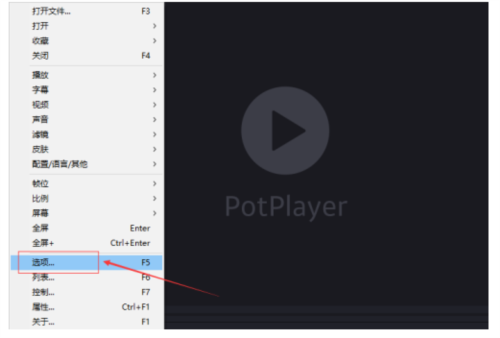
二、打开后,在下拉菜单列表中找到[选项],单击进入
点击左侧[滤镜]下的[源滤镜/分离器]
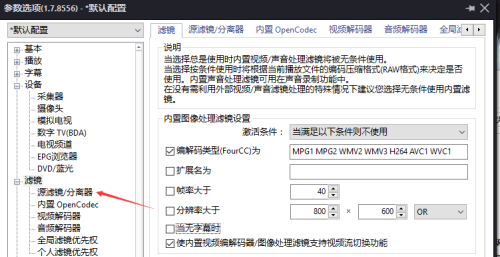
四、进入界面,点击【内置源滤镜/分离器设置】

5.找到[DIRAC数据预读]
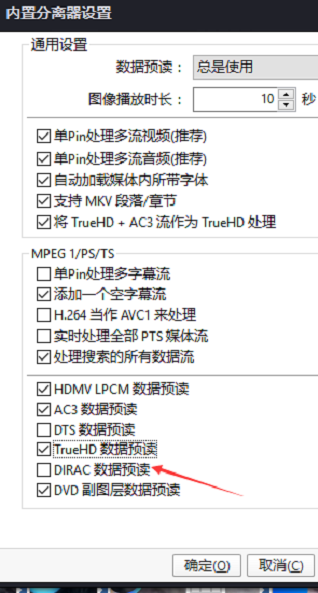
检查[DIRAC数据预读],然后点击[确定]设置成功
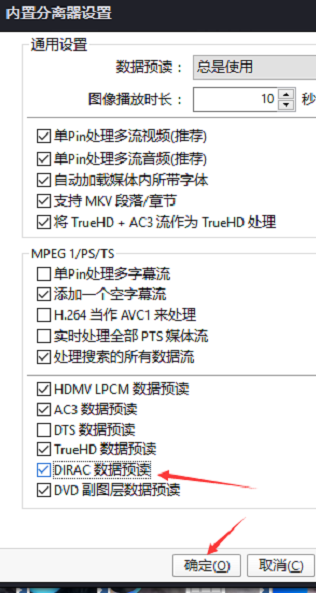
DIRAC数据预读设置成功后,用PotPlayer视频播放器播放此类视频会更加流畅。以上是我带给你的PotPlayer设置相关教程,希望对你有所帮助。
本文由“血瞳”发布,不代表“写客百科”立场,转载联系作者并注明出处:https://www.ixieke.com/shuma/157299.html
